Tag: NAV Development Environment

  • Sorry, that didn’t work – Debugging AL from VS Code

    Sorry that didn't work
    So you’ve installed your NAV 2018 developer environment, fired up VS Code, pressed F5 (publish and debug), the Web Client starts to load and…

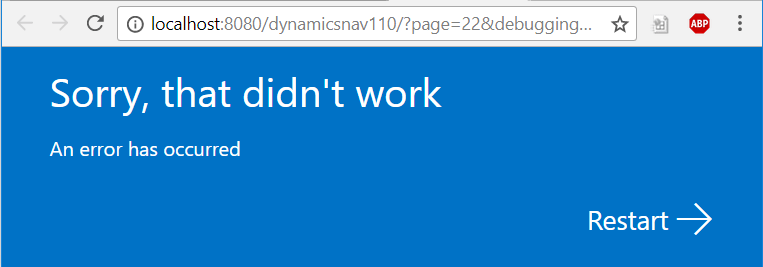
    Sorry, that didn’t work
    An error has occurred

    If you look in the Windows Event Viewer and find the message below, read on for the solution:

    Server instance: DynamicsNAV110
    Tenant ID:
    <ii>User: BLANKED\Dan.Kinsella
    Type: System.InvalidOperationException
    Message: <ii>Dynamic operations can only be performed in homogenous AppDomain.</ii>
    StackTrace:
    at System.Runtime.CompilerServices.CallSiteBinder.BindCore[T](CallSite`1 site, Object[] args)
    at System.Dynamic.UpdateDelegates.UpdateAndExecute2[T0,T1,TRet](CallSite site, T0 arg0, T1 arg1)
    at Microsoft.Dynamics.Nav.Service.Dev.Web.Controllers.DebuggerHub.OnDebuggeeConnected(Object sender, DebugSessionStartEventArgs eventArgs)
    at Microsoft.Dynamics.Nav.Runtime.Debugger.DebugRuntimeManager.OnDebuggingSessionStarted(DebugSessionStartEventArgs e)
    at Microsoft.Dynamics.Nav.Runtime.Debugger.DebugRuntimeManager.CreateRuntime(String debuggingContext, NavSession session, Boolean waitForDebugAdapterConfiguration)
    at Microsoft.Dynamics.Nav.Runtime.NavSession.StartDebuggingSession(String debuggingContext, Boolean waitForDebugAdapterConfiguration)
    at Microsoft.Dynamics.Nav.Service.NSService.OpenConnection(ConnectionRequest connectionRequest)
    at SyncInvokeOpenConnection(Object , Object[] , Object[] )
    at System.ServiceModel.Dispatcher.SyncMethodInvoker.Invoke(Object instance, Object[] inputs, Object[]& outputs)
    at Microsoft.Dynamics.Nav.Service.ServiceOperationInvoker.ErrorMappingCombinator(ServiceOperation innerOperation, NSServiceBase serviceInstance, MethodBase syncMethod, Object[] inputs, Object[]& outputs)
    Source: System.Core
    HResult: -2146233079
    </ii>

    The solution

    To enable AL debugging from VS Code we need to change the NetFx40_LegacySecurityPolicy setting in the Microsoft.Dynamics.Nav.Server.exe.config file to false.

    The Microsoft.Dynamics.Nav.Server.exe.config file is found in the Dynamics NAV service install directory, which (if you accepted the default) will be in the following location:

    C:\Program Files\Microsoft Dynamics NAV\110\Service\Microsoft.Dynamics.Nav.Server.exe.config

    Search the config file for the NetFx40_LegacySecurityPolicy setting, and change the enabled property to false:

    <NetFx40_LegacySecurityPolicy enabled="false"/>
    After restarting the service tier, try again and the Web Client should now open with a debug session.

  • Dynamics NAV Error: The following field must be included into the table’s primary key

    The following field must be included into the table’s primary key:

    The following field must be included into the table’s primary key: Field User Name Table: User

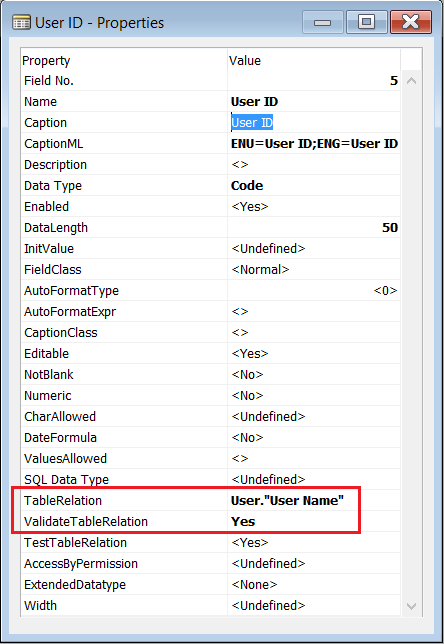
    The following field must be included into the table's primary keyThe issue originates in the TableRelation property of the underlying table. In this instance, a field (“User ID”) on a custom table is using the User table for lookup:

    TableRelation PropertyThe field used in the TableRelation property (“User Name”) must be part of the primary key of the related table (User). Although the User table has “User Name” defined as a secondary key, it is not part of the primary key.

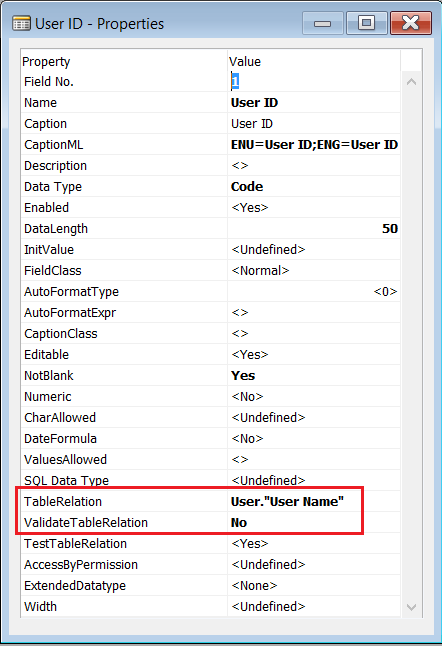
    Standard NAV table User Setup (Table ID 91) provides a solution to this issue:

    TableRelation Property

    As you can see in the image above, the ValidateTableRelation Property has been set to “No”. This allows the user to enter any value in the field without NAV validating that the record exists in the related table, which will avoid the error, but still allow the user to lookup the User ID in the User table.

    Interestingly, Microsoft have ignored their own advice regarding the TestTableRelation property:

    If you set the ValidateTableRelation property to No, then you should also set the TestTableRelation property to No. Otherwise, a database test on the field relations in a database may fail.

    Instead, Microsoft have added code to validate that the User Name specified exists which replaces the ValidateTableRelation property.

    This means a a test on the field relations should pass, as the table relation test includes secondary keys:

    [TestTableRelation] Sets whether to include this field when evaluating field relations between primary and secondary indexes.

    In conclusion

    Setting the ValidateTableRelation field property to “No” can be used to stop NAV from validating a foreign key relationship, whilst still enabling the standard lookup functionality via the TableRelation property. If you do set this property to “No”, you’ll most likely want to create your own validation in code (OnValidate trigger for instance), or if you really don’t care if the value exists in the related table, then set the TestTableRelation property to “No”.

  • Dynamics NAV: Export licensed objects – filter licensed Objects

    Filter Licensed Objects

    A handy tip for when you want to export all the NAV Objects you can in text format but you keep getting licence permission errors when hitting objects out of your licence range (third-party add-ins for instance).

    The Lock function in the NAV Development Environment allows you to lock an object to stop other developers modifying objects you’re currently working on. Why am I telling you this? Well, a nice little feature of Lock is it will only lock Objects in the current licence range… Thus, If you select all objects from the Object Designer and invoke the Lock function (File->Lock or Ctrl+Alt+L) you can now filter on all locked objects.

    Finding Unlicensed Objects

    Tip #2: You want to test a NAV licence against the Objects in a database. In the NAV Development Environment change the licence to the one you wish to test and attempt to lock all objects (as described above). Filtering on the Objects where locked = No will give you a list of all unlicensed Objects.

    Happy locking!